
On-premises synthetic-media analysis
Know what you are looking at, before you act on it.
DeepFakeShield examines audio and video for evidence of synthetic generation and returns a decision with its reasons and an evidence record. It runs inside your network, and submitted media is deleted after analysis.
Scores are uncalibrated detector statistics, not probabilities.
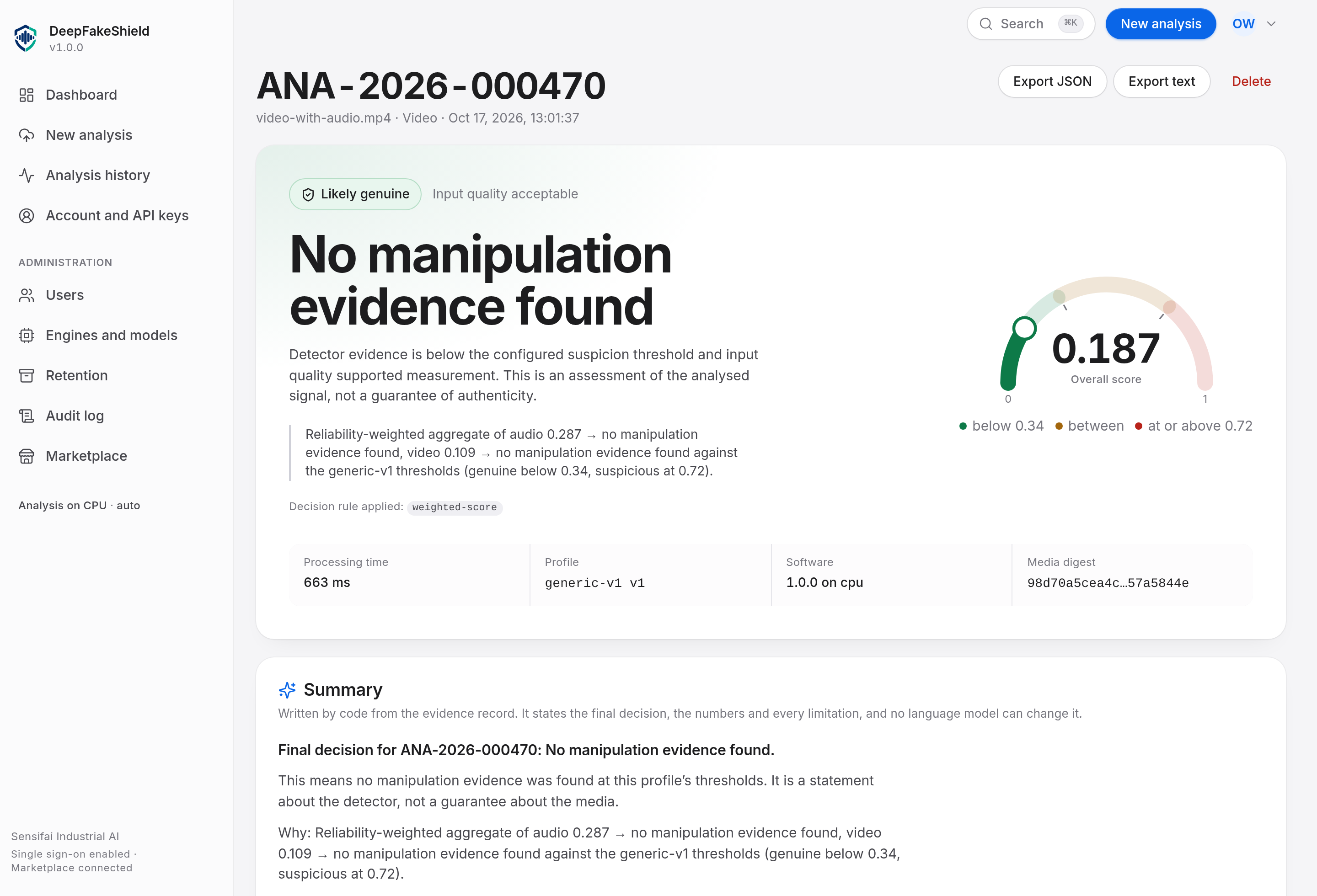
Four states, not two
Likely genuine, uncertain, suspicious or analysis failed. The thresholds between them are configuration, recorded with every analysis, and each state carries its reasons.
A record for every result
Media SHA-256, engine and version, weight checksums, thresholds in force, measurements and the rule that fixed the decision, sealed with a digest.
Your media stays put
Decoding and scoring run in your deployment. Nothing is uploaded to us, and media is deleted when the analysis finishes unless you ask for it to be kept.
Submit
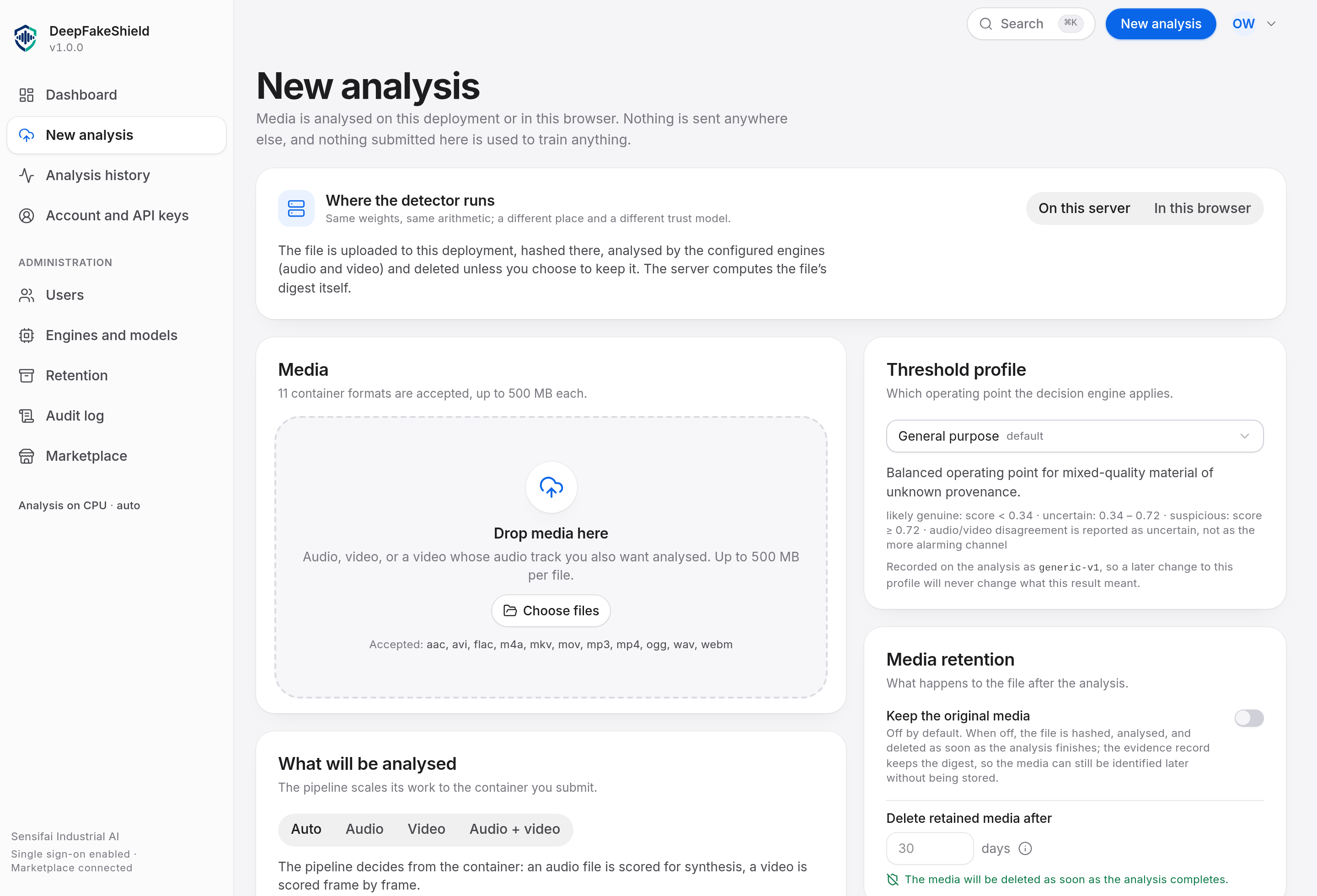
Drop in a recording. Or send it to the API.
Audio and video go through the same screen and the same endpoint. The file is checked against its actual byte signature, analysed, and removed. A video’s audio track is analysed in the same request.
WAV, MP3, M4A, AAC, FLAC, OGG · MP4, MOV, WebM, MKV
Evidence
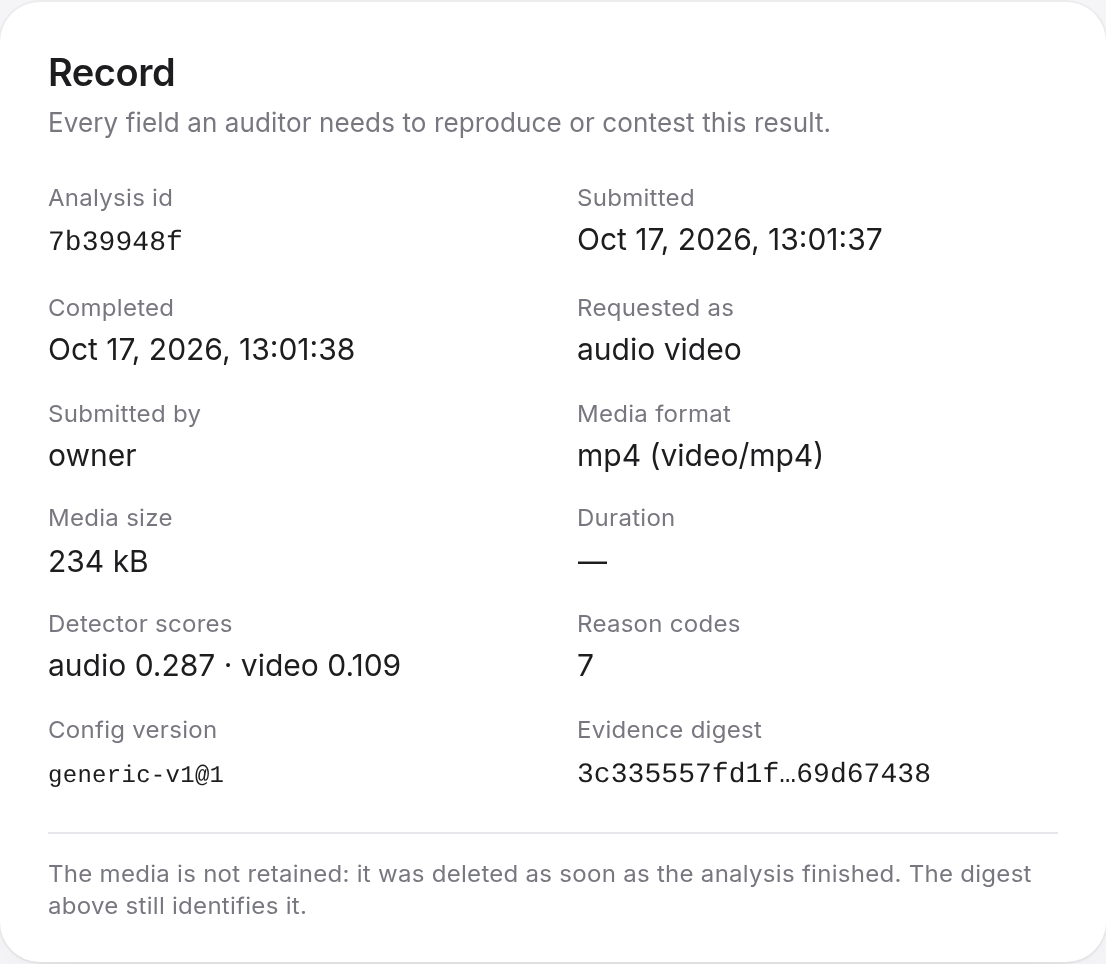
A result you can read back later.
Every analysis produces one document naming the exact engine, model version and weights checksum that produced it, the quality of the input, and the thresholds in force. The API re-verifies its digest before serving it, so an altered record is detectable.
History
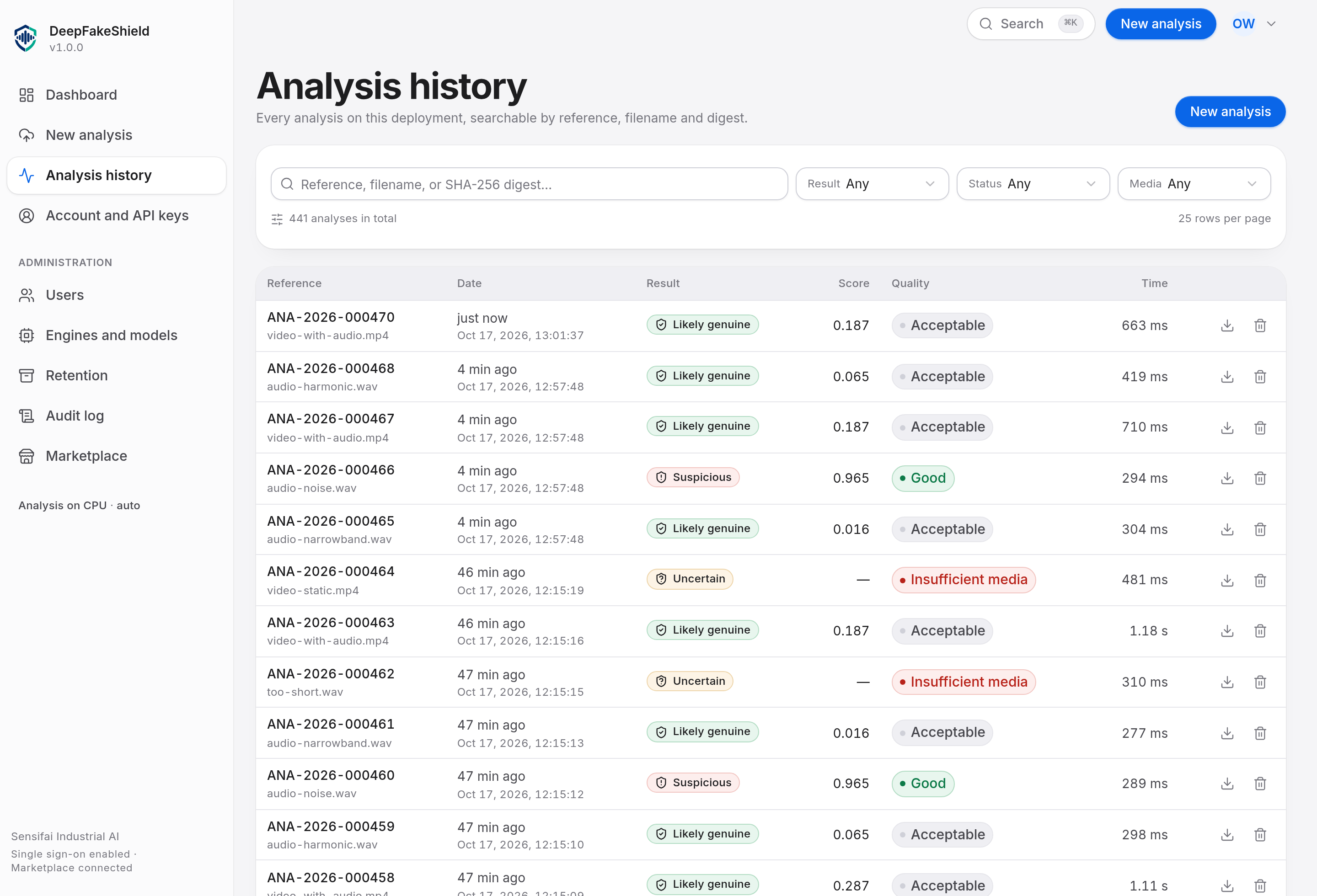
Find it again. Export it.
Search by reference, file name or media digest; filter by decision or media kind. Any row opens its result, and any result exports as JSON or as a report a reviewer can read.
What it will not claim.
Most tools in this category lead with a percentage. We would rather tell you where the edges are.
Scores are not probabilities
No engine here has a calibration record, so a score is a detector statistic that is compared with a threshold. Treat it as a way to order evidence, not as a likelihood.
No detection rate is published
The product has not been evaluated against a public benchmark, so there is no measured statement about what it catches and what it misses. We do not publish an accuracy figure.
Known blind spots
The built-in acoustic engine keys on vocoder regularities and is weak against neural speech synthesis with natural prosody. The built-in video engine analyses whole frames and does no face localisation.
Where it runs.
On infrastructure you operate.
One compose stack
Docker Compose with Postgres and the API. Bring your own TLS terminator. The built-in engine is CPU-only, so a laptop-class host produces results with no GPU and no model downloads.
Optional neural sidecar
A PyTorch sidecar adds trained models such as AASIST for audio. Point FORENSICS_WORKER_URL at it and the same API returns results from those engines, naming each one in the record.
No internet required
Analysis never needs to reach the internet. Model weights are installed from a local path and checked against a recorded SHA-256; an engine that has changed says so.
32 machine-readable reason codes cover synthesis scores, input quality, absence of evidence and engine faults.
Questions.
Answered from what this deployment does. Where the honest answer is “we have not measured that”, it says so.
How accurate is it?
We do not publish an accuracy figure, because no operating point has been measured on a labelled corpus in this deployment. The engines report a detector score on a 0–1 scale and compare it against configured thresholds; those thresholds are configuration, not a measured error rate.
What the evidence record does say is whether the score is calibrated. It currently says uncalibrated for both engines, and the result screen states that in plain words. When a calibration has been fitted and verified against a named corpus, the field changes and the figure can be quoted with it.
What happens to the recording I submit?
It is analysed inside this deployment and then deleted — by default, as part of the same operation that completes the analysis. What remains is the evidence record and the media’s SHA-256, which is enough to identify the same bytes if they are submitted again.
Retention is opt-in. If an operator asks for it, the expiry is written into the record and enforced by a sweep. Nothing leaves the deployment at any point: there is no media egress, and no telemetry back to the vendor.
Does the score mean "probability this is fake"?
No, and the interface never presents it that way. The score is a decision statistic produced by the engine and compared against a threshold. A number labelled as a probability when nothing has been calibrated is precisely the kind of claim this product exists to avoid making.
What does UNCERTAIN mean, and what should I do with it?
It means the evidence examined does not support a classification at the operating point in force — the score fell between the thresholds, or the input quality was too poor to carry a confident finding. It is a real answer, not a failure: ANALYSIS_FAILED is the separate state for "the analysis did not complete".
In practice, treat UNCERTAIN as unresolved. If the decision is consequential, that means an independent method — a second recording, a provenance check with the source, or a specialist examination.
Why did a band-limited phone recording come back as suspicious?
Because that is what the measurements said, and the result tells you which measurements. Narrowband audio loses the high-frequency detail that separates natural speech from synthesis, so the acoustic engine has less to work with and the quality assessment reports LOW_QUALITY alongside the score, with AUDIO_LOW_QUALITY in the reason codes.
The quality assessment is part of the result for exactly this reason: a finding about a 4 kHz call recording is a weaker finding than the same score on a studio master, and the record says which one you have.
Can it analyse the audio track of a video as well as the picture?
Yes, and it does so by default. A video with an audio track is decoded into timed frames and its audio track is demuxed and scored as a second, independent channel.
When the two channels point in different directions — one carrying manipulation evidence and the other not — the result reports AUDIO_VIDEO_DISAGREEMENT and states that a single whole-clip classification is not supported. Re-dubbed and partially manipulated media behave exactly like that, so the disagreement is reported rather than averaged away.
Does it need a GPU or an internet connection?
No. The built-in engines are deterministic signal-forensics implementations that run on CPU, need no downloaded weights, and work on a host with no network access at all. That is what ships running by default.
The optional neural sidecar (AASIST for audio, Xception with RetinaFace for video) is a second backend for a GPU host. Models are replaceable plugins: the version that produced a result is recorded in it, and a model whose checksum does not match its registry entry refuses to load rather than running quietly.
What does it not detect?
It has not been evaluated against a public deepfake benchmark, so there is no measured statement about which manipulation families it catches and which it misses. A manipulation method that the configured engines were not designed to notice will not be reported as suspicious just because it is new.
It also does not identify artefact types. No engine in this product can say "this face shows boundary blending", so no field claims one — the reason codes name conditions the code actually tests.
And it cannot prove authenticity. LIKELY_GENUINE means the evidence examined is consistent with authentic capture. It is not a certificate.
Can I integrate it with our own systems?
The REST API is the same one the interface uses, documented with OpenAPI 3.1 at /api/v1/docs. Submit media with POST /api/v1/analyses, poll for the result, and fetch the sealed evidence record as JSON or as a plain-text report.
Authentication is a scoped API key or a session. A key carries exactly the permissions its scopes grant and never more than its creator had, and a revoked key stops working on the next request. Every error is an RFC 7807 problem document carrying a correlation id that matches the log line.
Is our material used to train anything?
No. Submitted media is not used for training, and no path exists for it to leave the deployment to be trained on. The deployment is yours: your hardware, your database, your identity provider.
What does an evidence record contain?
Everything needed to reproduce or contest a result: the analysis id and reference, the submission time, who or what submitted it, the media format and size, the media SHA-256, the media metadata, each detector’s score, the quality assessment, the decision state, every reason code, the processing time per channel and in total, the engine and engine version, the model version and weights digest, the configuration version, and the operating point in force.
The whole document is sealed with a digest, and the API re-verifies that digest before serving it. Nothing here can be edited after the fact without the change being detectable.
How long does an analysis take?
On the reference deployment, roughly 300 ms for a short audio clip and about 1.1 seconds for a short video with an audio track, on CPU. Throughput under sustained load has not been measured, and the product does not claim a figure for it.
Try it on a file you already have.
Sign in, drop a recording in, and read the result. The API behind it is documented and open to your own tooling.